Resident request tracking
Define the intake fields, routing rules, ownership, staff actions and resident-visible updates for a nonemergency service.
Map a service-request workflow
WEBSITES, WORKFLOWS & COMMUNITY INFORMATION
Build a focused staff tool or resident request workflow around the work your agency actually needs to complete.
Start with a repeatable handoff: a resident reports a problem, a service desk checks it, a department accepts ownership, and someone verifies the outcome. Government workflow automation can connect those steps through forms, queues, reminders and status updates. A useful system makes the next action visible and keeps responsibility with a person.
Civicfield Systems designs focused staff tools, resident request tracking and interdepartment workflows around your current process. A standalone tool may be enough. An integration is considered when your existing platforms provide supported access and the agency approves how information will move.
If the main problem is finding public information, start with website design and navigation. If it is reviewing an announcement, explore content planning and approvals.
Define the intake fields, routing rules, ownership, staff actions and resident-visible updates for a nonemergency service.
Map a service-request workflowOrganize policies, forms, contacts and assigned tasks around what staff need to find or complete. Search, permissions and review dates belong in the scope.
Explore the fictional staff portalAgree on who offers a handoff, who accepts it, what happens if it is declined and how overdue work is reviewed. Keep escalation rules explicit.
Try the fictional request walkthrough| Starting point | A useful approach | Check before building |
|---|---|---|
| A few requests with clear ownership | Improve the shared process and working template first. | Can staff maintain the record and see the next action? |
| Repeated manual entry across tools | Evaluate a supported integration. | API access, permissions, field mapping and error handling. |
| A handoff no existing tool supports | Prototype a focused custom workflow. | Roles, exceptions, maintenance and acceptance criteria. |
| An existing platform already fits | Configure or improve its use before replacing it. | Licensing, export options and staff training. |
A custom system is not automatically the right purchase. Review existing capabilities, operational ownership and the full support burden before choosing an implementation.
Test what happens when an integration is unavailable, a request is incomplete, a department declines ownership, a duplicate is found or a completed request is reopened. Agree on who can see staff notes, what residents see and how an unsuccessful action is retried without creating duplicate work.
AI-assisted development can help produce a prototype. People review the workflow and implementation before real use. The demonstration does not establish production security, live identity checks or compatibility with an agency platform.
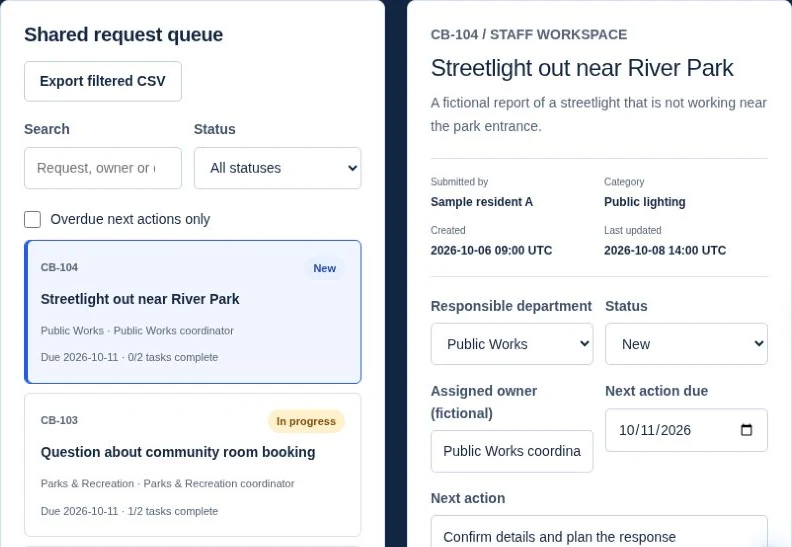
The Cedar Bay walkthrough lets you submit a sample request, route it, plan work, record an update, resolve it and inspect a resident receipt. Use it to discuss the process with your team. For your own planning, the workflow guide and workbook explain how ownership and closure records fit together.
A useful project brief includes one priority service, the departments involved, the current tools, expected users and the failures you want to prevent. The requirements scope builder can help record integration questions alongside a broader website project.
GUIDES, ANSWERS & PLANNING TOOLS
Map the handoff, choose an implementation and check whether the process is helping.
How do we map intake, ownership and closure?
Explore this resourceShould we configure, buy or build a workflow tool?
Read the guideWhat should we confirm before connecting government systems?
Read the guideHow should we measure service-request performance?
Read the guideWhich recurring government process should we automate first?
Read the guideWhat does a government workflow implementation cost?
Read the guideWhere can AI assist staff while people retain approval?
Read the guideTAKE THE NEXT STEP
Explore the relevant service, use a planning resource or try a fictional workflow before defining the work for your agency.
Explore guides & toolsProject inquiries are currently unavailable. Check contact availability.