Content audit
A blank inventory with stable IDs, responsible departments, user tasks, decisions, action owners and future checks.

EDITABLE WORKBOOK + COMPLETE GUIDE
Turn a content inventory into a clear review and upkeep plan. Download the editable workbook, use the blank sheets for your own records and follow the worked example below.
No sign-in or email required. No macros, uploads or automatic publishing.
MAKE THE REVIEW ACTIONABLE
An audit is useful when it leads to a specific next action. This workbook helps a public-service team inventory pages, documents, forms and events, check service facts against authoritative sources, and assign the work that follows. It suits a focused upkeep review or the content planning before a website redesign.
Start with important resident tasks: finding hours, preparing an application, understanding a fee, locating a meeting or reaching the right service. Include the documents and forms those pages depend on. A tidy page can still lead to an outdated attachment, so review the whole path.
A blank inventory with stable IDs, responsible departments, user tasks, decisions, action owners and future checks.
A separate record for each claim, its authoritative source, the reviewer and every place affected by a correction.
Instructions, a field dictionary and a clearly fictional Cedar Bay example. Working sheets stay blank for your own records.
A PRACTICAL REVIEW PROCESS
Use an evidence reference that your team can actually find: a controlled review record, approval reference, corrected live URL or documented comparison. This template records the review; it does not certify accessibility or replace specialist testing.
FICTIONAL WORKED EXAMPLE
Cedar Bay is fictional. This example is not a client project or a record of completed work.
Content ID CB-W001 refers to /library. The page says Saturday opening is 9 AM. A fictional Hours Memo v2 says 10 AM from January 9, 2027. The reviewer records the upcoming change on December 15, 2026 and checks both the website and a social draft.
Confirm the effective date and approve wording for the future change. Do not describe 10 AM as current hours before January 9. Keep the website and social draft consistent, then record the review and live-change evidence.
The workbook includes this example on Guide and example, away from the blank inventory. Its source date is left blank because the example supplies a version and service effective date, not a memo publication date.
READ THE FLAGS IN CONTEXT
Calculated review flags identify duplicate or unmatched IDs, missing owners, overdue actions, unresolved fact checks, missing evidence for Done, and a removal review without an authorization reference. A blank row produces no status. The workbook does not invent a quality score or treat an empty cell as success.
Use the dropdowns for decisions, priority and workflow status. Enter real dates, rather than strings that only look like dates. Keep the calculated columns intact and increase row heights for longer notes. Each working sheet has 200 prepared rows, filters and frozen headers. For a larger inventory, update all linked formula ranges, validation and filters before extending the prepared area.
Open the file in an Excel-compatible application with automatic calculation enabled. If you import it into another application, check dates, dropdowns and formulas before relying on the flags. Keep your internal workbook in your organization’s approved storage; it stays in your control and is not uploaded to Civicfield Systems.
EVERY FIELD HAS A PURPOSE
Open a sheet’s dictionary to see what to enter. Blank means unknown; use a source version and/or a known source date.
Review flags list recorded gaps. Verified content ID links a complete, matching-source fact check to its content item. A match requires a unique fact ID, an unambiguous linked content ID, claim, source/version or source date, checker/date and affected locations. These formulas support your review; they do not authorize changes.
TRY A SMALL MIGRATION MAP
Record an old URL, proposed destination, owner role, content decision and review date. Check for duplicates, shared destinations and missing decisions before your team agrees on a migration plan.
Your notes stay in this tab. No crawl, upload, saving or automatic changes. Reload clears them. Use public paths and role names; keep personal records, credentials and confidential details out. Flags identify recorded gaps, not verified content or approved redirects.
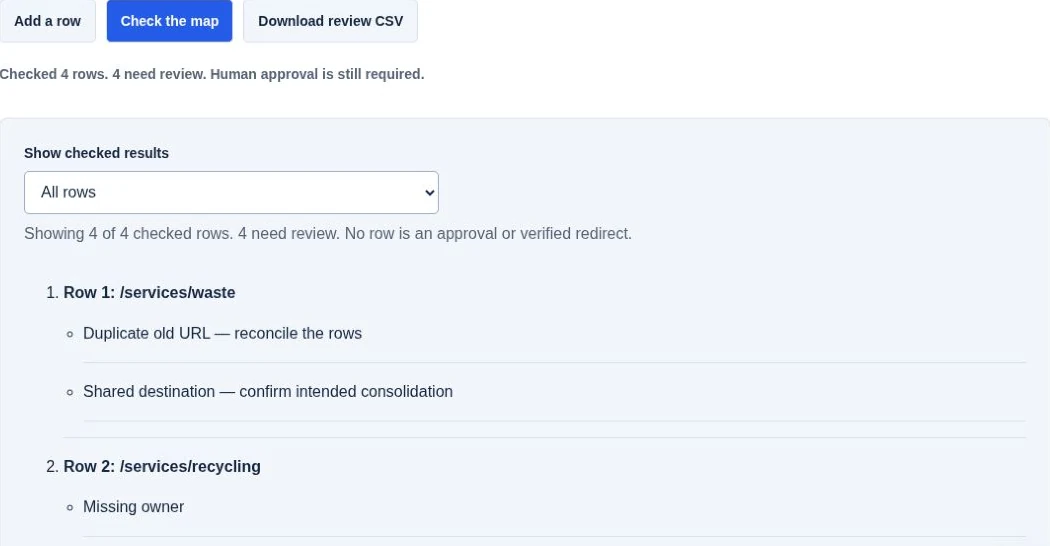
Run checks to review your notes. Up to 50 rows, 500 characters per field. Paths, query strings and case are preserved for matching; URL fragments are ignored and flagged.
Several old URLs may intentionally lead to one destination. Review a shared destination before treating it as a collision. Removal is always a proposal for authorized retention and archival review. CSV cells are quoted and formula starters are neutralized; review the exported file in your spreadsheet application.
COMMON QUESTIONS
Yes. Inventory important pages and documents, agree on owners and decisions, and carry the useful IDs into migration planning. Add redirects, permissions and acceptance checks to your project scope separately.
No. It records a proposal for authorized review. Confirm retention, archival, public-records and approval requirements with the responsible people before a removal action. Preserve an authorization reference.
No. Your reviewers supply the findings and evidence. The formulas identify recorded gaps and linked records; they do not crawl pages or verify external sources.
No. Download and edit it within your own approved storage. There is no email gate or upload form. You can discuss the scope of a review by email without sending confidential material.
REFERENCE GUIDANCE
Georgia’s Content Tools (opens in a new tab) provides resources for planning and managing web content, including an inventory template. Iowa’s Auditing Content guide (opens in a new tab) explains practical review fields, responsibilities and ways to prioritize an audit.
This Civicfield workbook is an original template informed by those general practices. It is not an official state template or an endorsement. Map the operational work behind a service page with the service request workflow workbook. Pair the inventory with the public-service content calendar when a factual change also affects email or social drafts.
| Content condition | Trigger or priority | Review evidence |
|---|---|---|
| Time-sensitive action | Before the deadline or occurrence and on a source change | Full date, timezone, availability and current next action. |
| Consequential service rule | On policy change and a justified planned check | Authorized fact owner and approved revision. |
| Frequently changing details | On operating change and a capacity-based interval | Hours, location, contact and linked destination checked. |
| Stable explanation | Planned review based on use and consequence | Source still supports the answer; owner remains assigned. |
| Historic record | Agency-approved records and access process | Status, provenance and access route, without unauthorized alteration. |
Record why the next check is due and who will perform it. Unknown ownership is itself an action, not a reason to assign a distant date. The table is a proposed prioritization model, not a statutory retention or review schedule.
Use the existing owner, source-check, action and review fields in the workbook. Document the risk rationale in the appropriate notes; no new automated scheduling is implied. A check completed with no change should record the actual source inspected. Do not advance a public “updated” date merely because a row was touched.
Connect the priority to content governance and the source-verification worksheet.
CONTENT REVIEW & UPKEEP
Discuss a focused content review, named ownership or ongoing upkeep. Share your public website and the service paths you want to improve. Keep confidential records and credentials out of the project notes.
Check contact availabilityProject inquiries are currently unavailable.