Publications
Blank rows for exact drafts, destinations, owners, proposed times, dependencies, approval and live verification.

EDITABLE WORKBOOK + COMPLETE GUIDE
Plan useful service updates with facts, exact drafts and human approvals in view. Download the editable workbook and keep every channel-specific revision accountable.
No sign-in or email required. No macros, uploads or automatic publishing.
PLAN THE WORK, THEN RECORD THE DECISION
A publishing date is only one part of a public-service update. Your team also needs the exact service facts, a complete channel-specific draft, the person responsible for it and an explicit decision about that version. This editable workbook keeps those records together for website, email, social, calendar and other communications.
Start with a useful audience action: understand changed hours, prepare for a meeting, find a service or know where to submit a routine request. Use a shared item ID for the underlying update, then a unique Publication ID for each channel-specific revision. That makes it easier to find every draft affected when a service fact changes.
Blank rows for exact drafts, destinations, owners, proposed times, dependencies, approval and live verification.
Claim-by-claim checks tied to shared items, with source versions, verified values and one exact affected Publication ID per check.
Complete instructions and a fictional example that stays Not ready while approval and a website dependency are pending.
A HUMAN REVIEW WORKFLOW
The workbook does not connect accounts, authenticate approvers, enforce permissions or post content. Keep authorization and access controls in your organization’s approved tools.
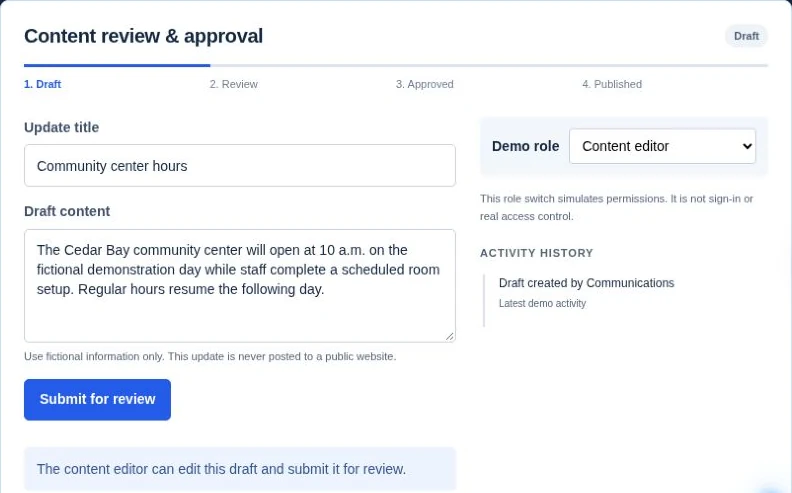
FICTIONAL WORKED EXAMPLE
Cedar Bay and Hours Memo v2 are fictional. This is not a client publication, approval or delivery record.
Shared item CB-C001 links a library-hours update. Social revision social-v1 has Publication ID CB-S001, a proposed time of December 18, 2026 at 9 AM and the named timezone America/New_York. Its checked fact says Saturday opening becomes 10 AM from January 9, 2027.
Scheduling, actual publication and live-verification records remain blank. First complete and verify the website update, then obtain explicit approval of social-v1. Keep the future effective date clear in every version.
The example is separate from the blank working sheets. It illustrates decisions to record; it does not grant permission to publish anything.
UNDERSTAND THE CALCULATIONS
Ready requires complete identifiers, department, audience/action, topic, channel, exact destination, draft reference, owner, proposed date/time, named timezone and dependency description. It also requires resolved dependencies, confirmed facts with complete source checks linked to this exact Publication ID, a named fact reviewer/date, explicit Approved status, an approved revision that exactly matches Current revision, a named approver/date and Current revision state.
Not ready means at least one recorded prerequisite is missing or inconsistent. Duplicate Publication IDs, unresolved sources and a mismatched approved revision prevent Ready. If expiry is recorded, it must be a real date/time later than the proposed time. A blank row has no computed status.
Publication record describes what has been recorded. Scheduled needs a scheduling reference, publisher and scheduling time. Published needs the actual time and live URL; live verification also needs Confirmed, a checker and a check date. A record is not proof of authenticated approval or delivery.
Dates and times are local wall-clock values in the named timezone. The workbook does not convert timezones or automatically check whether expiry has passed. Recheck expiry and authorization immediately before action. The proposed-date reminder uses the date in your spreadsheet application.
MAKE THE CONTENT USABLE
Use clear service language and descriptive links. Add useful image descriptions, keep essential text from a graphic in the accompanying content, and review captions before sharing video. Check the features and limits of each platform during review, rather than assuming an image or post will work everywhere. North Carolina’s communications and social media accessibility checklist (opens in a new tab) is a practical starting point.
If a source or draft changes, revisit every affected Publication ID. Withdraw or request changes to the old approval, create a new channel revision and repeat fact review and approval. Use Superseded or Cancelled to preserve the history. A live error needs a named correction action and a fresh live check.
The two working sheets provide 200 prepared rows each, dropdowns, filters and frozen headers. Enter real dates and leave unknown information blank. Keep formula columns intact and increase row heights for longer notes; update all linked ranges, filters and validation before extending the prepared area. Confirm dates, formulas and dropdowns after an import to another application.
Your completed workbook stays in your own approved storage. There is no email gate or upload to Civicfield Systems. Keep passwords, secrets and private resident details out of the planning file.
EVERY FIELD HAS A PURPOSE
Use a new unique Publication ID for every channel-specific draft revision. A Shared item ID can link several publications about the same service fact.
Ready checks recorded prerequisites. Publication record describes recorded actions. Review flags identify missing facts, approval, dependencies, owners and record details. Confirmed publication ID links a complete source check to its exact publication revision and matching shared item: it requires a unique Fact ID, linked item, claim, source/version or source date, verified value, reviewer/date, Confirmed outcome and one exact, valid affected Publication ID.
COMMON QUESTIONS
Use separate Publication IDs and exact destinations for each channel-specific revision. Reuse the Shared item ID so a changed source can be traced to all versions.
No. It checks the decisions and prerequisites recorded in the file. Confirm current authorization, facts, dependencies and expiry in your approved process before taking an action.
Keep approval Pending and record the next follow-up. Silence, a proposed date and a completed fact check do not approve the draft.
No. It is an editable planning file with no macros or publishing connection. Use separately authorized tools and retain the workbook in your own approved storage.
REFERENCE GUIDANCE
Granicus’ content approval guidance (opens in a new tab) discusses planning reusable content, identifying approvers and setting deadlines. The exact-revision records and readiness rules in this original Civicfield template help make those responsibilities visible.
Use the website content audit workbook to track the underlying page or document update. If you need branded materials or support for a staff-led calendar and approval workflow, explore our social content service.
For the operational handoffs behind a service update, use the service request workflow workbook.
For an event change, record the series or occurrence ID, authoritative destination, original details, new approved details and source revision. Add the website, calendar listing, scheduled posts and any approved email version to the affected-channel check. Do not mark the correction finished while an outdated reminder remains scheduled.
For one canceled session in a series, distinguish that date from later confirmed sessions. Keep the series destination stable where it still serves the same task. For a distinct meeting occurrence, keep its own records and participation context. The event correction procedure explains the URL and publication decisions.
The workbook’s existing revision, source-check and approval fields record these decisions manually. It does not cancel scheduled posts or synchronize a calendar. Staff must perform and verify those actions in the approved tools, then record the actual result.
PUBLISHING SUPPORT
Discuss branded materials, a staff-led calendar or an authorized publishing setup with explicit client approvals. Share the channels and review process you need to support. Keep confidential records and credentials out of the project notes.
Check contact availabilityProject inquiries are currently unavailable.