Workflow map
Define entry conditions, responsible roles, required information, actions, evidence, next steps and escalation.

PROCESS MAP + EDITABLE REQUEST TRACKER
Give every nonemergency request a clear next step, an accountable owner and a checked outcome. Use one workbook to map the process, maintain a current record and practice the handoffs with your team.
This guide and workbook cannot receive, route or manage actual service requests. Submit real requests through the responsible agency’s official channels. For immediate danger or urgent hazards, follow local emergency instructions and use the appropriate official emergency channel.
Four sheets. No sign-in, email gate, macros or upload. Keep personal information in your approved system, using reference IDs in the workbook.
START WITH ONE SERVICE
A request tracker helps only when the people using it agree on the process behind each row. This resource works for a small service desk, a department or a larger organization coordinating several teams. Begin with one ordinary request category and walk through it with the staff who receive, work on and answer questions about it. On Workflow map, primary and alternate next-step fields let one decision branch to two destinations; link additional decision steps when more branches are needed.
Map what happens today, including phone calls, queues and informal workarounds. Where does the request enter? Who checks jurisdiction and location? Where does it wait? Who explains the result? Keep the resident’s experience alongside the staff process. Digital.gov’s journey-mapping and service-blueprint guidance provides useful ways to examine those complementary perspectives.
Define entry conditions, responsible roles, required information, actions, evidence, next steps and escalation.
Maintain one current-state row per stable Request ID, with its owner, status, next action, target and outcome.
Record offers, acceptance, updates, decisions, closure and reopening. The fourth sheet contains instructions and a separate fictional example.
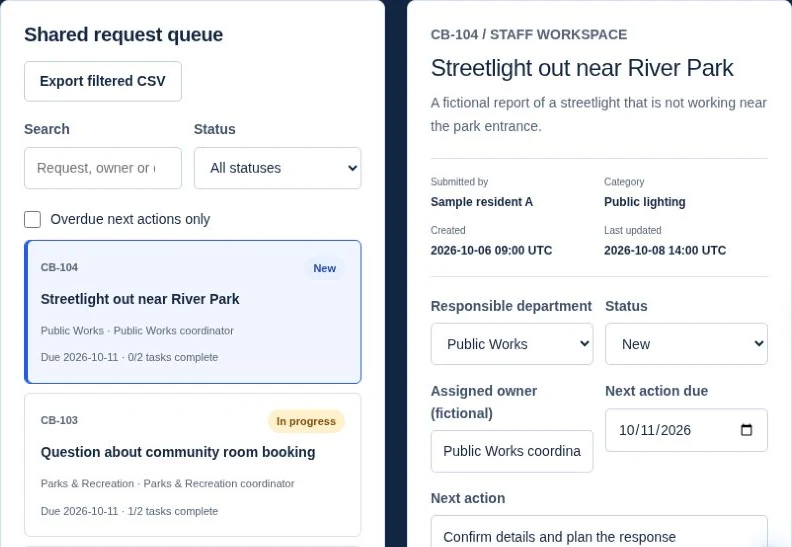
The workbook helps your team plan and record the handoffs. If you need supported routing, staff queues or a custom implementation, explore government workflow automation and staff tools.
SCOPE & MINIMUM INTAKE
Plan an acknowledgement with the request reference, submitted summary and next step. The USWDS “Keep a record” pattern explains why a usable record and relevant reference information matter after a submission.
For an out-of-scope report, record the reason and a verified official referral destination. Explain whether the requester must contact that destination. A referral record does not establish that another organization received, accepted or resolved the issue.
ROUTING & ACCOUNTABILITY
Use category and location to identify a proposed receiving team. Record Handoff offered, Handoff accepted and Handoff declined as different events. The current accountable owner remains responsible until the receiving role explicitly accepts. Sending an email or filling in a proposed department does not transfer accountability.
Define a fallback decision-maker for unclear boundaries, absent staff and declined transfers. If a department rejects the route, preserve the offer, rejection and reason in the log. The current owner follows up, offers the request to the correct team or escalates under the agreed rule.
If you later use routing software, test missing locations, overlapping areas, category changes and reopening. CivicPlus’s SeeClickFix assignment documentation describes product-specific rule ordering and location behavior. This workbook is an original planning aid and performs no automated assignment.
Agree allowed transitions locally. A straightforward case may skip Waiting; a declined proposed handoff should not appear as accepted assignment.
WAITING, UPDATES & ESCALATION
Record a concrete next action and a full next-update date/time in the agency’s named timezone. Identify the waiting dependency and the role that will follow up. Apply the agency’s escalation rules rather than inventing a universal service deadline.
Unknown deadlines stay blank and show Target not set. The workbook compares a due value only after you enter an explicit Review date / time and Agency timezone on Guide and example. It then shows “Overdue at review time” or “Not due at review time.” It does not read the current clock, convert timezones, calculate business hours or send reminders.
Refresh the review controls before each review. All dates are local wall-clock values in that named timezone. These checks describe the entered information at that review time; they are not live service-level monitoring. If a target changes, record the old target, new target, reason and responsible role in an activity event.
OUTCOMES & EVIDENCE
Before closure, check that the outcome matches the evidence and that required resident follow-up is recorded in the approved system. Record the outcome, evidence reference, closure verifier, actual closure date/time and follow-up reference.
A duplicate cannot reference itself, an unknown ID or another duplicate. Check that both requests concern the same issue. Closing a duplicate does not mean that the original work is complete, and the duplicate’s outcome must remain Duplicate.
If new information reopens the issue, append a Reopened event with its reason, timestamp and evidence reference. Keep the earlier closure event and outcome in history. Set the current status, owner and next action, and clear old closure fields from the current record until the new result is verified. Decide under local policy whether a new occurrence should instead receive a linked, new Request ID.
KEEP THE TWO RECORDS ALIGNED
The editable log is not a secure audit trail. It does not authenticate actors, enforce permissions, prove actions happened or certify compliance. Use your approved operational system for actual requests, evidence, access controls and retention.
Each working sheet has 200 prepared blank rows, filters, frozen headers, date formatting and dropdowns. The fictional example stays on its own guide sheet. Sort the entire table, including calculated columns; never sort one ID column alone. Extending the prepared range requires updating every linked range, formula, validation and filter. AutoFit or expand row heights to read long notes and every warning. Confirm calculation and date behavior after importing into another spreadsheet app.
FICTIONAL WORKED EXAMPLE
Cedar Bay, its roles, places and records are invented. This is not a client project, real service request or turnaround promise. All dates below are local wall-clock times in America/New_York. Urgent hazards are outside this routine maintenance example.
Practice exceptions too: offer to the wrong department and retain the declined route; leave a waiting deadline unknown; close a duplicate against a valid original; then reopen while preserving the earlier closure event. None of those cases should silently become completed work.
WHAT EACH COLUMN MEANS
Expand a sheet to review its inputs. The workbook’s Guide and example sheet includes the same definitions and dropdown choices. Keep calculated columns intact. ID fields must not contain ~ * ? = < >.
Review flags appear on all three working sheets. Requests also shows Target check, evaluated against the explicit review controls. Activity log shows Recorded owner after event: Receiving owner only for Handoff accepted; otherwise Previous / retained owner. These are consistency aids based on editable records, not authenticated proof or permission to act.
COMMON QUESTIONS
Yes. Keep the responsibilities distinct even when one person performs them. Follow local requirements for independent verification or approval.
The current owner remains accountable. Log the unsuccessful handoff, identify the fallback decision-maker and set the next review. The workbook cannot compel acceptance or notify the team.
Only a verified Completed outcome indicates completion of the defined work. Duplicate, Referred out of scope, Withdrawn and Unable to complete explain other endings. Always read status and outcome together.
No. It records planning information and manual updates. Use approved operational systems for notifications, correspondence and real requests. This website has no request-submission or file-upload facility.
Leave it blank. The record shows Target not set. Enter a date only when the responsible team has agreed it, and use the explicit review time and agency timezone before interpreting overdue text.
No. It is an original Civicfield planning workbook. It does not provide live case management, emergency dispatch, authentication, secure audit history or a compliance guarantee. Review it against your agency’s own process and records requirements.
REFERENCES & RELATED RESOURCES
The original template draws on general practices described in Digital.gov’s journey and service-blueprint guidance, the USWDS record-keeping pattern and CivicPlus’s product-specific assignment guidance. Those sources do not endorse this workbook or replace agency policy.
Use the website content audit workbook to check the service information residents rely on, and the content calendar workbook to plan reviewed updates. For the website around those services, see our local government website approach and cost and scope guide.
Begin with the receiving team’s task, then ask why each field is needed. Separate a resident’s observation from staff classification. A person can describe a damaged sign without knowing its internal asset code. Provide an approved route for incomplete location information rather than forcing an inaccurate answer.
| Field | Resident-facing purpose | Staff or data decision |
|---|---|---|
| Issue description | Explain what happened in plain language | Avoid requesting sensitive narrative not needed for the task. |
| Location or asset description | Help staff identify the issue | Use address alternatives or a descriptive location where appropriate. |
| Category | Support routing when the choice is understandable | Allow staff review rather than making the resident settle department boundaries. |
| Photo | Add useful context if optional and authorized | Set upload, privacy, access and retention rules before accepting files. |
| Contact route | Enable approved follow-up when needed | Explain purpose; keep personal details in the authorized operational system. |
| Reference and received time | Confirm receipt and support traceability | Generate stable IDs and define the recorded timezone. |
Mark required fields with a reason tied to the service. Test labels, errors, confirmation and the assisted route. Follow the service-page pattern for instructions before the form. The workbook’s stable IDs and evidence references support process planning; they do not replace the operational system’s access or privacy controls.
Fictional examples. CB-R002 reports the same paint damage to park table P12 already recorded under CB-R001. Staff verify that the issue is the same and that CB-R001 exists and is not itself a duplicate. CB-R002 can close with outcome Duplicate and a link to CB-R001, after the required checks. CB-R001 remains open until its own work is verified.
If a report concerns an asset maintained by another organization, record the boundary decision, the verified official referral destination and the requester’s next step. Close with Referred out of scope only when the agency’s closure checks are satisfied. That does not mean the other organization accepted or completed the report.
If the same location develops a new problem after a completed repair, staff decide under local policy whether to reopen the original or create a linked new occurrence. Preserve history either way. Do not send a duplicate into a chain of other duplicates or overwrite Completed with a new event that erases the earlier result.
Use the existing outcome dictionary above. Keep Duplicate, Referred out of scope and Completed separate in reporting, following the metrics guide. Closing administrative records is not the same as completing physical work.
A WORKFLOW YOUR TEAM CAN EXPLAIN
Discuss a process review, clearer intake instructions or a practical digital workflow. Share a public service page and the process you want to improve. Keep actual requests, confidential records and credentials out of your inquiry.
Project inquiries are currently unavailable.
For planning and project discussions. Real public-service requests belong in the responsible agency’s official channels.
Move social questions into an accountable service route.
A public comment may ask a general question or describe an individual case. The channel monitor first uses the approved agency boundary: give a verified public-information answer when appropriate, direct service work into the approved intake route, and follow the authorized urgent-information process for urgent reports. Do not ask for private details in a public thread.
If policy permits staff-assisted intake, record the request in the authorized system and give the person its reference through an approved channel. Avoid copying sensitive correspondence into the planning workbook. If the resident must submit the request themselves, explain that next action without implying a case has already been accepted.
Name who owns the handoff until the receiving service accepts it. A forwarded message is an offer, not acceptance. The original owner follows up on missing or declined acceptance, and the service owner authorizes the operational response. Keep a public reply concise and suitable for the audience.
The social strategy should state monitoring windows and the approved intake link. Test an ordinary question, a private case detail, an unclear jurisdiction and an absent receiving owner before adopting the process.