FOR CITIES, COUNTIES & PUBLIC AGENCIES

Municipal website cost.
Start with a clear scope.

Know what goes into the initial project, what continues after launch and which questions make a proposal useful to your agency.

UNDERSTAND THE SCOPE

What does a municipal
website cost?

The cost depends on what your agency needs to build, move, connect and maintain. A useful proposal separates the initial project from recurring services, states its assumptions and shows what the agency must provide. A page count alone does not describe the work: hundreds of documents, complex integrations or several departments with different publishing roles can change the scope substantially.

This guide explains cost drivers and questions to put into a procurement brief. Civicfield Systems develops a project proposal after reviewing your requirements. No single price on this page can stand in for that assessment.

SETUP & RECURRING WORK

Compare the whole project.

Initial setup and implementation

  • Discovery, resident tasks and information architecture
  • Design, templates, CMS configuration and development
  • Content review, document migration and URL redirects
  • Integrations, testing and corrections
  • Editor training, documentation and launch support

Ask which deliverables are included, how reviews work and what would require a change in scope. Agency staff time for content decisions and acceptance review belongs in the plan too.

Recurring costs and responsibilities

  • Hosting, domain renewals and applicable platform licenses
  • Software updates, maintenance and monitoring
  • Third-party services and integration support
  • Optional content, document or social media support
  • Agreed support coverage and future improvements

Ask who pays each provider, who owns each account, what renewal terms apply and which services can be changed or ended. Separate necessary operating costs from optional ongoing work.

THE MAIN COST DRIVERS

Look beyond the number of pages.

Questions that help define a municipal website proposal
Work areaWhat changes the effortWhat to clarify
Content & documentsThe amount of usable content, outdated pages, scans, PDFs, languages and department review needed.Who inventories, rewrites, converts and approves material? Which records should be archived, with whose approval?
Design & CMSTemplate variety, editing roles, approval workflows, search and reuse of existing systems.Which resident tasks and staff actions must each template support? What can the agency maintain itself?
Accessibility testingThe templates, documents and interactive features in the test scope, plus remediation and retesting.What standards, manual checks, test evidence and acceptance criteria does your agency require?
IntegrationsVendor access, API support, authentication, data mapping, error handling and ongoing dependencies.Is a labeled link sufficient, or is a supported integration required? Who owns the connected systems?
Training & supportNumber of editors, departments, sessions, documentation and support arrangements.What is included at handoff? Which updates and support requests will staff handle, and which need assistance?
Launch & migrationURL changes, staging reviews, content freeze, validation and coordination with existing providers.Who approves launch, checks redirects and handles the transition? What rollback and handoff steps are required?

WRITE A USEFUL PROCUREMENT BRIEF

A scope checklist
for your project.

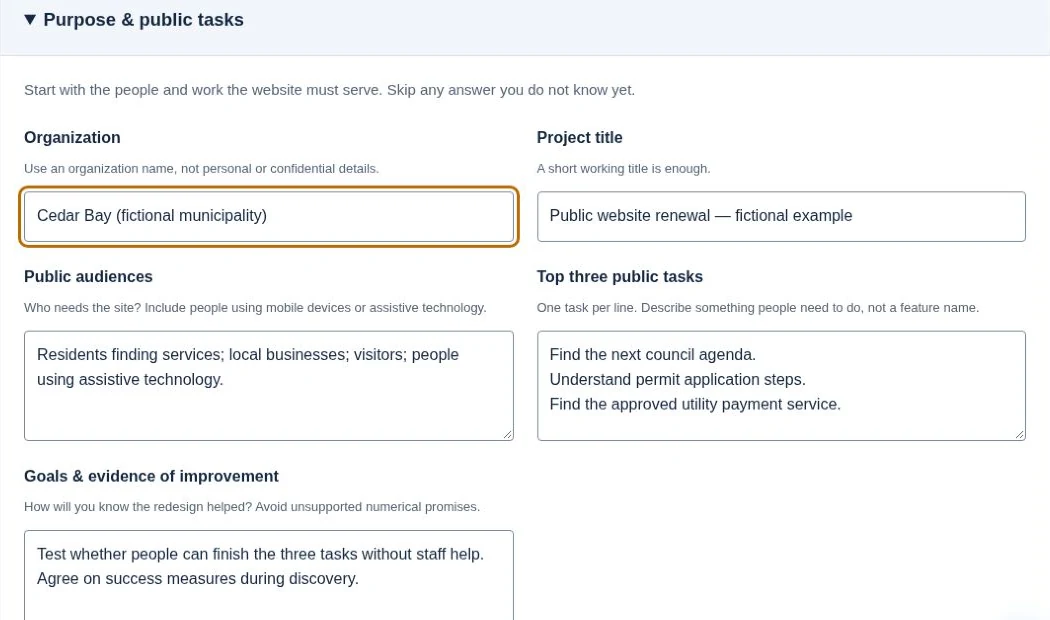
Purpose and public tasks fields in the actual requirements brief builder, filled with its fictional Cedar Bay example.
Owned website requirements builder: purpose and public-task fields from the fictional Cedar Bay example.

A clear brief helps reviewers compare proposals against the same work. It also identifies decisions that must be made before a vendor can offer a dependable scope.

  • Purpose and users: priority resident tasks, audiences, departments and current problems.
  • Content inventory: approximate pages and documents, languages, archive rules and responsible reviewers.
  • Staff publishing: expected editors, permissions, approvals, CMS preferences and training needs.
  • Systems and data: existing framework, hosting, payment, agenda, records or request systems; vendor contacts and supported interfaces.
  • Requirements and testing: accessibility, privacy, security, records retention and procurement requirements from your agency, with review owners and acceptance evidence.
  • Deliverables and schedule: design and build outputs, review milestones, migration, training, launch support and dependencies on staff availability.
  • Ownership and exit: domain, accounts, source files, content, licenses, exports, documentation and any transition assistance.
  • Ongoing support: hosting and license responsibilities, maintenance tasks, support terms and optional content or social publishing help.

Specify a review and correction process rather than relying on a broad promise of compliance. For current federal web accessibility guidance, consult the Department of Justice guide (opens in a new tab) and your agency’s responsible reviewers.

REVIEW PROPOSALS WITH CONFIDENCE

Make assumptions
and options visible.

Check whether proposals cover the same content migration, document work, integration depth, training and support period. Ask for exclusions, third-party charges, renewal responsibilities, deliverable ownership and the process for additional work. Identify what your staff must supply and how delays in review affect the schedule.

A phased plan can begin with discovery and a representative prototype, then proceed to implementation once requirements are clearer. Optional content and social support can be scoped as ready-to-publish materials, a calendar and workflow staff run themselves, or an authorized publishing setup with human approval. Each option needs a named owner and a clear review process. The content calendar workbook helps record facts, exact revisions, dependencies and approval.

See our local government website design and redesign approach for resident tasks, CMS choices, migration and handoff. Independent community projects on the homepage and the fictional Cedar Bay demo illustrate the approach without claiming government client results.

DEFINE THE NEXT STEP

Bring the need.
Let’s work through the scope.

Share your organization, current website and the tasks you want to improve. Include known content, integration and procurement requirements. Please keep confidential records and credentials out of the project notes.

Check contact availability

Project inquiries are currently unavailable.