Known requirements
Work your team has agreed must be delivered, with a responsible reviewer and evidence to request.

WEBSITE REQUIREMENTS GUIDE + LOCAL SCOPE BUILDER
Turn public tasks, content and staff responsibilities into a practical website requirements brief. Use the guide to shape your RFP, then build a draft your team can review and vendors can price consistently.
Free, no email gate. Your answers stay on this page; copy or download a plain-text file when you choose.
START WITH THE WORK
A website RFP template is most useful when it helps a buyer make decisions. A long feature list can still leave vendors guessing about migration, approval steps or the work after launch. Begin with the public services people need and the staff who maintain them.
Choose three important journeys, such as finding a council agenda, understanding a permit application or reaching the approved bill-payment service. Describe who is trying to do each task, what a successful result looks like and where the current experience breaks down. Include people using mobile devices and assistive technology in the research and testing plan.
Then describe the capabilities those journeys require. “A resident can find the next meeting’s agenda from the meetings page” gives a vendor something to demonstrate. “Modern, user-friendly CMS” does not establish an acceptance check. A required platform may be a genuine organizational constraint; record its reason and the ownership or integration limits it creates.
Work your team has agreed must be delivered, with a responsible reviewer and evidence to request.
Useful additions vendors can separate from the baseline, with their effects on cost and timing.
Unverified quantities, decisions or responsibilities. Keep them visible instead of implying a complete scope.
MAKE THE BOUNDARIES VISIBLE
Count pages, public documents, forms and connected services separately. A short page may link to hundreds of PDFs. A simple-looking form may depend on a staff queue, records process or third-party service. Record an estimate and its source, or write Unknown. An unknown inventory is a discovery task, not a zero-cost migration.
Use a website content audit to assign owners and propose keep, rewrite, merge or archival-review decisions. Ask who supplies approved copy, who remediates documents, who maps old URLs to new destinations and who validates the migrated sample. Content removal and retention decisions need the organization’s authorized review.
A link sends a visitor to another service. An embed displays another provider’s interface inside a page. An API integration exchanges data and can add authentication, error handling, permissions, security and maintenance work. List the approach for each service rather than asking for “integration” without a boundary. If it is undecided, ask the vendor to describe options and assumptions before pricing.
Include exclusions: replacing a payment platform, creating a resident account system or migrating internal records may be separate projects. Ask vendors to identify dependencies on other providers and anything they cannot validate themselves.
PLAN HOW THE WORK WILL BE CHECKED
Specify who drafts, reviews and publishes; which permissions differ by department; and what staff should change without vendor help. Request a demonstration of a routine edit and approval path, plus training and accessible reference materials. A content calendar can help carry those owners and review steps into ongoing upkeep.
Ask your responsible team to confirm the accessibility target and version. Include automated and manual checks, keyboard and screen-reader testing, representative documents, forms and third-party components, and usability sessions with people who need assistive accommodations. Require a findings record, remediation responsibilities and retesting. A design system, audit or widget alone does not establish compliance.
Acceptance evidence should match the scope: public-task demonstrations, a representative migration sample, redirect checks, an issue log, editor training, account handover and an export demonstration. Name who reviews each item and how unresolved defects are handled. Do not treat a launch date as proof that every requirement has been accepted.
Department review, approved content, access to existing systems and procurement decisions can control the critical path. Attach a buyer owner and realistic review window to each milestone. Before a scope change begins, ask for its effect on deliverables, fees and timing, then obtain the appropriate approval. Agree who decides on content freeze, launch readiness and fallback if launch checks fail.
MAKE PROPOSALS COMPARABLE
Request separate lines for one-time implementation, hosting, licenses, maintenance and content support. Ask for quantities, service limits, renewal assumptions, optional work, taxes and extra-work rates. Choose a common comparison period without confusing that planning period with an approved budget or contract term. The municipal website cost guide explains the main cost drivers.
Clarify who controls the domain and administrator accounts, which content and deliverables can be exported, their formats, any third-party license limits and the support or fees involved in leaving. Ask who handles updates, backups, restoration, incidents and post-launch content changes. An attractive initial price can omit work the buyer still needs to fund.
Set buyer-defined evaluation criteria and any weights before comparing proposals. Use the same task demonstration and evidence requests for each vendor. Ask whether a capability exists now, requires configuration, needs custom development or is only on a roadmap. Check relevant experience and references using your organization’s process; keep legitimate insurance, reference and other mandatory requirements intact.
Have procurement and legal reviewers supply the final mandatory requirements, response instructions and contract terms. This guide does not generate clauses, attestations, purchasing approval or a compliance certificate. It is an original planning aid, with no agency endorsement and no scoring preference for Civicfield Systems.
FICTIONAL WORKED EXAMPLE
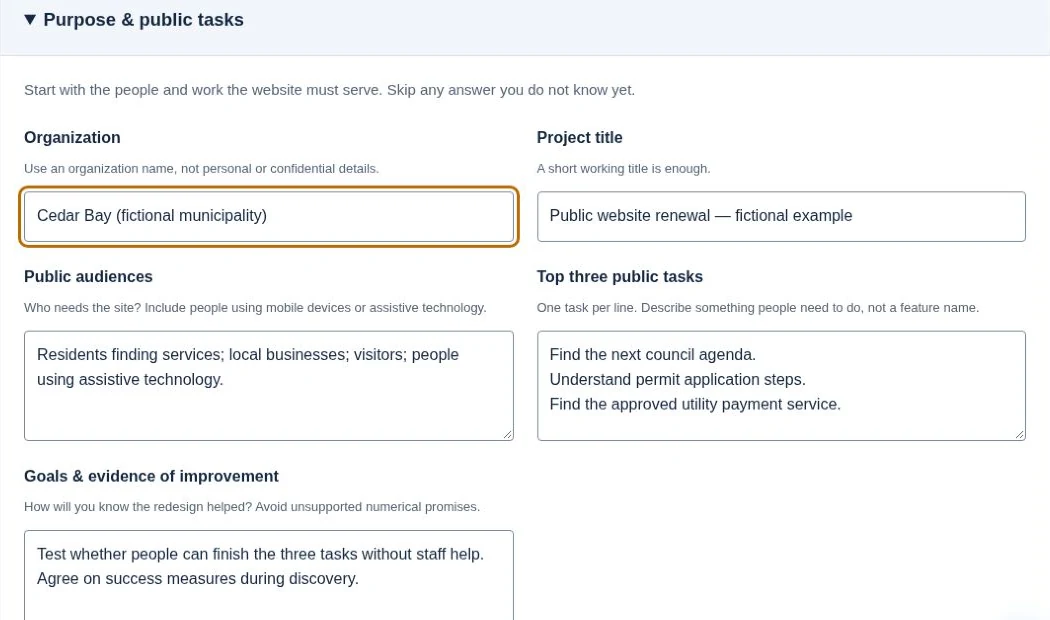
Cedar Bay is fictional. This is an illustration, not a client project, procurement opportunity or completed result.
The team wants people to find a council agenda, understand permit steps and reach an existing utility payment service. It estimates 80 public pages, but its document inventory is unknown. The payment service needs a link; a meeting-calendar embed still needs review.
The brief separates required navigation, migration, testing and editor training from optional rewriting. It excludes replacing the payment system. The clerk and department owners need to confirm document responsibilities and approved content before vendors can finalize the scope.
The example contains no budget or vendor prices. Its proposed accessibility target, three-year cost comparison and training allowance are illustrative inputs for review. They are not recommended defaults or approved organizational requirements.
BUILD A WORKING DRAFT
Start blank or load the fictional example. Its example marker stays in the brief until you choose Clear all notes, even after you edit some fields. Open each group when you need it. Every field is optional; unanswered items become explicit questions. Use roles instead of personal details, and keep confidential information and credentials out.
Planning aid, not legal/procurement advice; your procurement/legal team approves final requirements.
Answers are processed in this browser tab, with no uploads, account connection, email sending or server storage. There is no saved draft or shareable state URL. Reloading or reopening starts blank. Back may restore your browser’s page snapshot; download before leaving if you need to keep the work. You choose where the downloaded file is stored and who receives it.
Review this text before sharing. Edit the planning fields above, then update, copy or download again. The text box is read-only and can be selected for copying. No Word or PDF file is generated.
BEFORE YOU ISSUE AN RFP
No. It creates a requirements-planning brief. Your authorized team must confirm the purchasing process, mandatory qualifications, insurance, references, security/privacy, records obligations, response instructions and contract terms. The brief does not decide those requirements.
Yes. A clear scope and comparable response format can support an early discovery conversation or request for an estimate. Your organization decides which procurement route is appropriate and what approvals apply.
Record it as unknown and assign an owner to verify it. Ask vendors to price discovery separately or state a bounded migration assumption and a method for handling differences. Do not compare one vendor’s fixed quantity with another’s unlimited-sounding promise.
No. Notes can still conflict or be unverified. Review assumptions, quantities, responsibilities, acceptance evidence and mandatory requirements together. A filled-field count is not an approval or completeness score.
No. Copy and download stay under your control. Nothing is submitted or emailed by the builder. To discuss a project, start with a public website link and a non-confidential description.
REFERENCE GUIDANCE
The City of Waverly’s 2026 website redesign RFP (PDF, opens in a new tab) is a historical procurement example, with an April 6, 2026 submission deadline. It illustrates migration, training, hosting and itemized-cost questions; it is not an open opportunity or a universal template.
Yukon’s digital-tool evaluation guidance (opens in a new tab) offers context for consistent evaluation. The U.S. Web Design System’s design principles (opens in a new tab) and accessibility guidance (opens in a new tab) support user research and testing of the actual implementation.
These sources inform this original guide. Their organizational rules are not automatically your municipality’s rules, and no source endorses this tool. For a broader project overview, see local government website planning.
A scope phrase such as “ADA compliant” leaves the deliverable and evaluation unclear. Ask the authorized agency reviewers to establish applicable requirements, then describe what the provider must test, report, fix and retest. This planning matrix is not a completed compliance review or legal determination.
| Requirement field | Specify in the brief | Evidence requested |
|---|---|---|
| Standard and scope | Applicable version/level and included content, documents, forms and external components | Reviewed scope and tested version. |
| Evaluation | Methods, representative tasks and qualified evaluator responsibilities | Test conditions, findings and limitations. |
| Remediation | Who corrects each type of issue and how fixes are retested | Issue record with owner and retest result. |
| Launch decision | Who reviews outstanding issues and authorizes the agency decision | Written decision with unresolved findings visible. |
| Maintenance | Checks after template, form, document and content changes | Ongoing owner and change-triggered review. |
For U.S. state and local entities, start with DOJ’s current Title II implementation guidance (opens in a new tab) and confirm scope, timing and exceptions with agency reviewers. A provider’s standard contract should not silently decide those questions for the agency.
Reference the W3C evaluation resources (opens in a new tab) when defining the technical review. Do not treat an overlay, a template claim or an automated score as the acceptance evidence for the completed journey. Record this detailed requirement in the builder’s acceptance and review fields, with specialist evaluation and document remediation separately scoped.
CLEAR SCOPE, PRACTICAL NEXT STEPS
Discuss a public website, content migration or staff editing workflow. Share a public link and a non-confidential description of what needs to improve.
Check contact availabilityProject inquiries are currently unavailable.